tabbed-faq-accordion
FAQ·Шаблон: Regalis - Lawyer, Attorney and Law Firms HTML Template·Складність анімації: subtle·Адаптивний: Так
Файли-джерела
- index.html
main > section:has(.accordion)
Бібліотеки
jquery
Summary
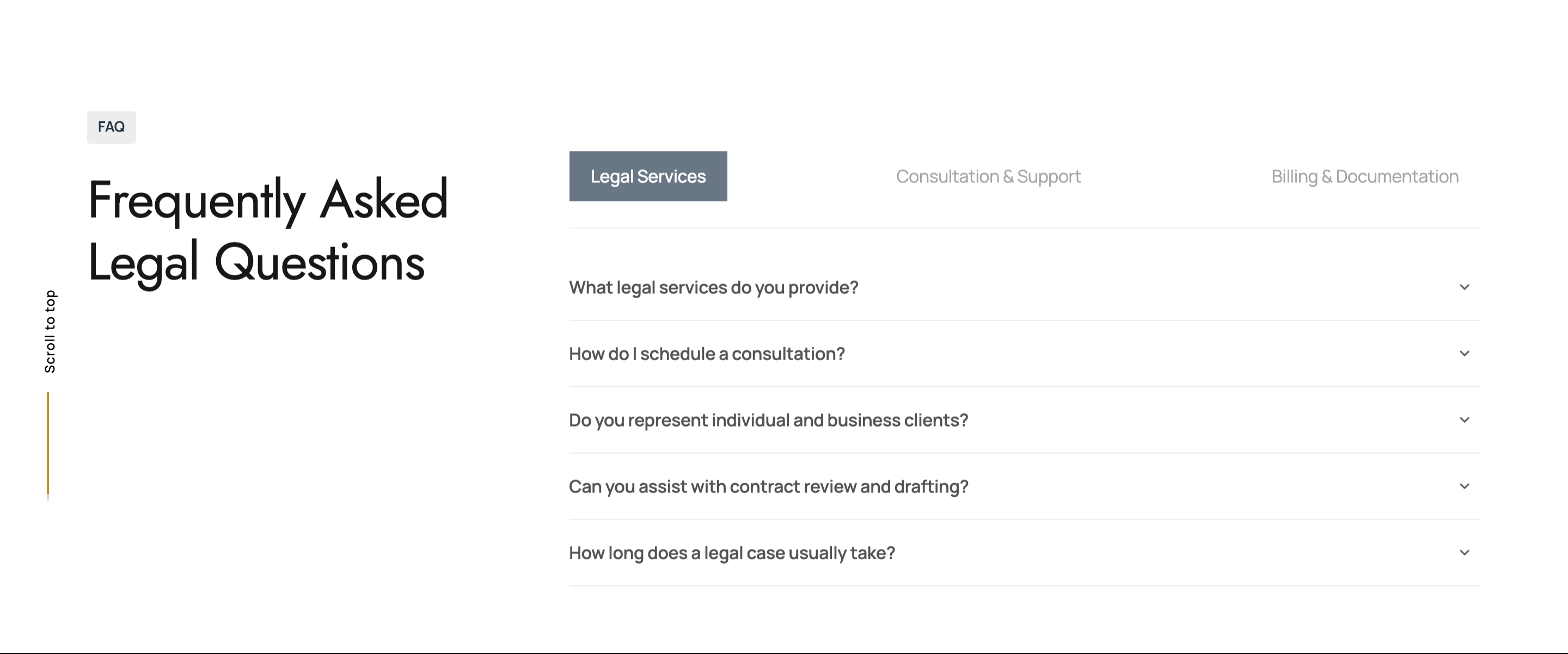
FAQ section with a left-side title block and, on the right, a three-tab category switcher (Legal Services / Consultation & Support / Billing & Documentation). Each tab swaps to its own accordion of five questions.
HTML structure (minimal)
<section>
<div class="container">
<div class="row g-4 gx-5 justify-content-between">
<div class="col-lg-4">
<div class="subtitle id-color wow fadeInUp">FAQ</div>
<h2 class="wow fadeInUp" data-wow-delay=".2s">Frequently Asked Legal Questions</h2>
</div>
<div class="col-lg-8">
<div class="de-tab wow fadeInUp" data-wow-delay=".4s">
<ul class="d-tab-nav mb-4 border-bottom pb-4 d-flex justify-content-between">
<li class="active-tab">Legal Services</li>
<li>Consultation & Support</li>
<li>Billing & Documentation</li>
</ul>
<ul class="d-tab-content">
<li>
<div class="accordion">
<div class="accordion-section">
<div class="accordion-section-title" data-tab="#accordion-a1">What legal services do you provide?</div>
<div class="accordion-section-content" id="accordion-a1">We handle civil litigation, corporate advisory...</div>
<!-- 4 more Q&A pairs -->
</div>
</div>
</li>
<li>
<div class="accordion">
<div class="accordion-section">
<div class="accordion-section-title" data-tab="#accordion-b1">How can I contact my assigned lawyer?</div>
<div class="accordion-section-content" id="accordion-b1">You may communicate via email, phone...</div>
</div>
</div>
</li>
<li>
<!-- Billing accordion -->
</li>
</ul>
</div>
</div>
</div>
</div>
</section>
Key SCSS tokens
.de-tab .d-tab-nav { display: flex; gap: 2rem; }
.de-tab .d-tab-nav li {
  cursor: pointer;
  position: relative;
  font-weight: 600;
}
.de-tab .d-tab-nav li.active-tab { color: var(--primary-color); }
.de-tab .d-tab-content > li { display: none; }
.de-tab .d-tab-content > li:first-child { display: block; }

.accordion-section-title {
  cursor: pointer;
  padding: 1rem 0;
  border-top: 1px solid #eee;
  font-weight: 600;
  position: relative;
}
.accordion-section-title::after {
  content: '+';
  position: absolute; right: 0;
  transition: transform .3s;
}
.accordion-section-title.active::after { content: '\2212'; }
.accordion-section-content {
  display: none;
  padding-bottom: 1rem;
}
Animation logic
// Tab + accordion live in the same designesia.js block
$('.de-tab .d-tab-nav li').on('click', function () {
  const idx = $(this).index();
  const $tab = $(this).closest('.de-tab');
  $tab.find('.d-tab-nav li').removeClass('active-tab');
  $(this).addClass('active-tab');
  $tab.find('.d-tab-content > li').hide().eq(idx).fadeIn(200);
});

$(document).on('click', '.accordion-section-title', function () {
  const $title = $(this);
  const target = $title.data('tab');
  $title.toggleClass('active');
  $(target).slideToggle(250);
});
Notable details
- Tabs and accordion compose: each tab's body IS an accordion, so users get categorical navigation followed by progressive disclosure.
- Question titles use
data-tab="#accordion-a1"to target the answer panel, leaving free choice over which Q&A is open by default. d-tab-content > li:first-child { display: block }is the trick that makes the first tab visible at first paint without JS executing first — no CLS.
Use when
- Help center, contracts, or pricing pages where questions naturally cluster into 2-4 categories.
- Long FAQ lists that would feel overwhelming without grouping.
Caveats
- Accordion does not enforce single-open: clicking a second title leaves the first open. To get exclusive open, add
$('.accordion-section-content').not(target).slideUp()before the toggle. - IDs (
#accordion-a1etc.) must remain unique across all three tabs —a/b/cprefixes prevent collisions.