contact-cta
Контакти·Шаблон: Potu - Personal Portfolio HTML Template·Складність анімації: medium·Адаптивний: Так
Файли-джерела
- index.html
section.contact-section
Бібліотеки
aosjquery
Summary
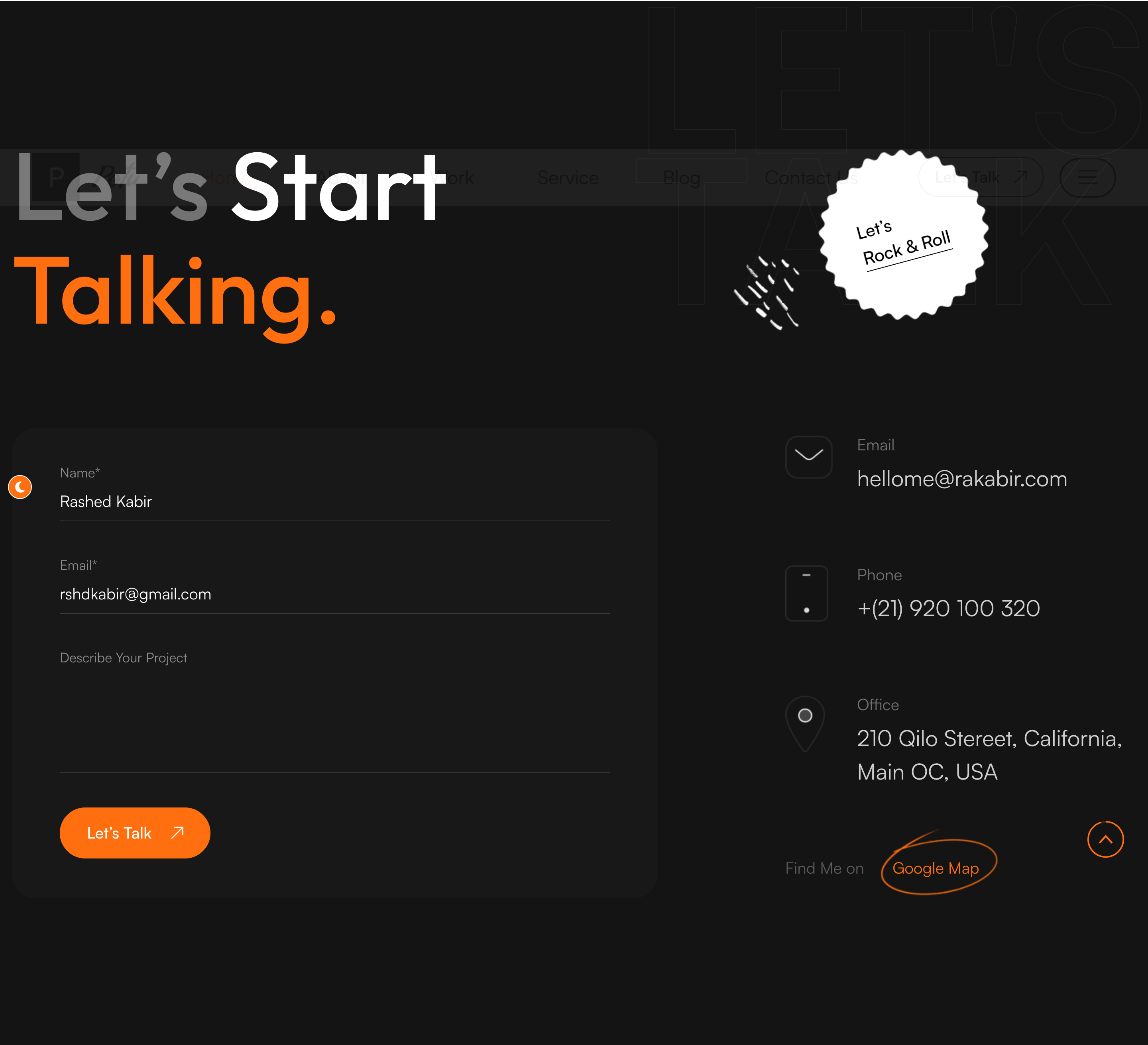
Combined contact CTA + form section. A decorated "Let's Start Talking" headline sits up top with a circular "Let's Rock & Roll" link bubble; below, a left-side validated contact form pairs with a right-side stack of email/phone/office cards.
HTML structure (minimal)
<section class="contact-section">
<span class="big-text">Let's<br>talk</span>
<div class="shape-box parallax-scene parallax-scene-3 anim-icons">
<div data-depth="0.40" class="shape" style="background-image: url(shape-22.png);"></div>
</div>
<div class="large-container">
<div class="title-box">
<div class="title-text" data-aos="fade-up">
<h2><span class="light-text">Let's</span> Start <span class="color-text">Talking.</span></h2>
</div>
<div class="link-box" data-aos="zoom-in">
<a href="#"><span>Let's<br>Rock & Roll</span></a>
</div>
</div>
<div class="row">
<div class="col-lg-7 form-column">
<form data-aos="fade-right">
<div class="form-group"><label>Name*</label><input type="text" name="name"></div>
<div class="form-group"><label>Email*</label><input type="email" name="email"></div>
<div class="form-group"><label>Describe Your Project</label><textarea name="message"></textarea></div>
<button type="submit" class="theme-btn"><span>Let's Talk</span></button>
</form>
</div>
<div class="col-lg-5 info-column">
<div class="info-content" data-aos="fade-left">
<div class="single-item">
<div class="icon-box"><img src="icon-5.png"></div>
<span>Email</span><h3><a href="mailto:hellome@rakabir.com">hellome@rakabir.com</a></h3>
</div>
<!-- phone, office -->
</div>
</div>
</div>
</div>
</section>
Key SCSS tokens
.contact-section { position: relative; padding: 160px 0; }
.contact-section .big-text {
  position: absolute; right: 0; top: 80px;
  font-size: 280px; line-height: .9; font-weight: 700;
  color: rgba(0,0,0,0.04);
}
.contact-section .link-box a {
  display: grid; place-items: center;
  width: 200px; height: 200px; border-radius: 50%;
  background: var(--theme-color); color: #fff;
  font-size: 24px; line-height: 1.2; font-weight: 600;
  text-align: center;
}
.contact-section input,
.contact-section textarea {
  width: 100%; padding: 18px 0;
  border: none; border-bottom: 1px solid rgba(0,0,0,0.20);
  background: transparent; font-size: 18px;
}
.contact-section .single-item .icon-box {
  width: 60px; height: 60px; border-radius: 50%;
  background: rgba(255,111,15,0.10); display: grid; place-items: center;
}
Animation logic
// Form validation via assets/js/validation.js (jQuery validate)
$('#contact-form').validate({ rules: { /* ... */ }});
// AOS handles fade-up / fade-right / fade-left of cells.
new Parallax(document.querySelector('.parallax-scene-3'));
Notable details
- The big circular "Let's Rock & Roll" pill is what makes this section memorable — it stands in for the typical big-orange-button.
- Form fields use the underline-only pattern (no boxes, no labels-as-placeholders), which photographs well in a portfolio.
- AOS directions form a centripetal entrance: fade-up for the title, fade-right for the form, fade-left for the info — drawing the eye to the centre.
Use when
- Project-inquiry pages where the same section needs both a "schedule a call" CTA and a working form.
- Single-page portfolios where contact is the final beat.
Caveats
- The form posts to
sendemail.php(PHP-based mailer); on a static host you must wire a third-party endpoint (Formspree, Web3Forms) instead. - jQuery Validate is required; without it the form has no client-side validation.