appointment-form
Форма·Шаблон: Medcity - Medical Healthcare HTML5 Template·Складність анімації: subtle·Адаптивний: Так
Файли-джерела
- index.html
section.contact-layout3
Бібліотеки
jquerybootstrap
Summary
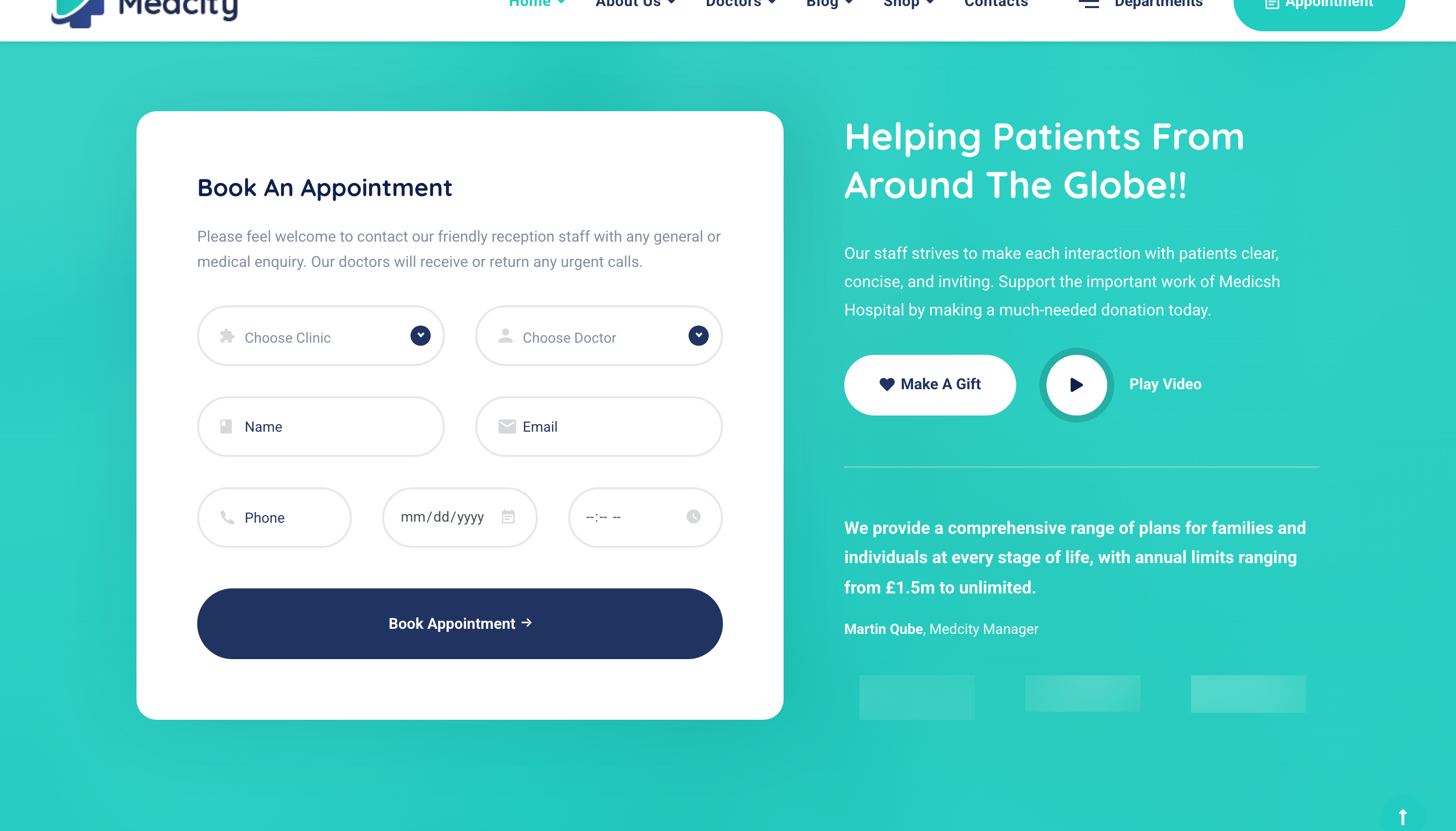
Two-pane appointment block over a teal-gradient photo banner. Left pane has a six-field booking form (clinic, doctor, name, email, phone, date) on a white card with iconified inputs; right pane has a heading, a "Make a Gift" CTA + video popup, manager signature, and a clients-logo carousel.
HTML structure (minimal)
<section class="contact-layout3 bg-overlay bg-overlay-primary-gradient pb-60">
  <div class="bg-img"><img src="assets/images/banners/3.jpg" alt="banner"></div>
  <div class="container">
    <div class="row">
      <div class="col-lg-7">
        <div class="contact-panel mb-50">
          <form class="contact-panel__form" method="post" action="assets/php/contact.php" id="contactForm">
            <div class="row">
              <div class="col-sm-12">
                <h4 class="contact-panel__title">Book An Appointment</h4>
                <p class="contact-panel__desc mb-30">Please feel welcome to contact our friendly reception staff…</p>
              </div>
              <div class="col-lg-6">
                <div class="form-group">
                  <i class="icon-widget form-group-icon"></i>
                  <select class="form-control"><option>Choose Clinic</option>…</select>
                </div>
              </div>
              <div class="col-lg-6">
                <div class="form-group">
                  <i class="icon-user form-group-icon"></i>
                  <select class="form-control"><option>Choose Doctor</option>…</select>
                </div>
              </div>
              <!-- Name / Email / Phone / Date inputs -->
              <div class="col-12">
                <button type="submit" class="btn btn__secondary btn__rounded">
                  <span>Book An Appointment</span><i class="icon-arrow-right"></i>
                </button>
              </div>
            </div>
          </form>
        </div>
      </div>
      <div class="col-lg-5">
        <div class="heading heading-light mb-30">
          <h3 class="heading__title mb-30">Helping Patients From Around the Globe!!</h3>
          <p class="heading__desc">Our staff strives to make each interaction with patients clear, concise, and inviting…</p>
        </div>
        <div class="d-flex align-items-center">
          <a href="contact-us.html" class="btn btn__white btn__rounded mr-30">
            <i class="fas fa-heart"></i><span>Make A Gift</span>
          </a>
          <a class="video__btn video__btn-white popup-video" href="https://www.youtube.com/watch?v=…">
            <div class="video__player"><i class="fa fa-play"></i></div>
            <span class="video__btn-title color-white">Play Video</span>
          </a>
        </div>
        <div class="text__block">
          <p class="text__block-desc color-white font-weight-bold">We provide a comprehensive range of plans…</p>
          <div class="sinature color-white">
            <span class="font-weight-bold">Martin Qube</span><span>, Medcity Manager</span>
          </div>
        </div>
        <div class="slick-carousel clients-light mt-20"
             data-slick='{"slidesToShow":3,"arrows":false,"autoplay":true,"infinite":true}'>
          <div class="client"><img src="assets/images/clients/1.png" alt="client"></div>
          <!-- … -->
        </div>
      </div>
    </div>
  </div>
</section>
Key SCSS tokens
.bg-overlay-primary-gradient::before {
  background: linear-gradient(120deg, rgba($color-primary, .9), rgba($color-secondary, .9));
}
.contact-panel {
  background: $color-white; border-radius: 8px; padding: 50px 40px;
  box-shadow: 0 5px 50px rgba(0,0,0,.08);
  .form-group { position: relative; margin-bottom: 25px;
    .form-group-icon { position: absolute; left: 18px; top: 50%; transform: translateY(-50%);
      color: $color-primary; font-size: 18px; }
    .form-control { padding-left: 50px; height: 50px; border-radius: 50px;
      border: 1px solid #f1f1f1; background: $color-gray; }
  }
}
.video__btn-white .video__player {
  width: 60px; height: 60px; border-radius: 50%;
  background: $color-white; color: $color-primary;
  display: flex; align-items: center; justify-content: center;
}
Animation logic
// Form validation kicks in via plugins.js (jQuery validate).
// Video popup is Magnific Popup (.popup-video). Clients strip is Slick autoplay.
// Selects are upgraded by nice-select to custom dropdowns (initialised globally in plugins.js).
Notable details
- All form inputs are pill-rounded (
border-radius: 50px) with an absolute-positioned icon at the left — a dense field stack still reads visually consistent. - The right pane stacks four affordances in one column (heading + lead, dual CTAs, signature paragraph, clients logo carousel). It works because each tier uses a different visual weight: prose, buttons, italics, then logos.
- The PHP form action (
assets/php/contact.php) ships with the template as a tiny mailer; production replacements should swap to a serverless function or framework controller.
Use when
- Appointment / booking / quote sections where the form should sit beside marketing reassurance copy and proof points (logos, signature).
- Healthcare, education, legal, agency landing pages that combine a primary lead capture with a video and trust signals on a single screen.
Caveats
- nice-select replaces native
<select>; accessibility and mobile keyboard behaviour suffer compared to native controls. - The PHP mailer is barebones (no rate limiting, no spam filtering) — not production safe.