tech-stack-marquee
Бігучий рядок·Шаблон: Davies - Personal Portfolio HTML Template·Складність анімації: medium·Адаптивний: Так
Файли-джерела
- index.html
section.section-tech-stack
Бібліотеки
jquery
Summary
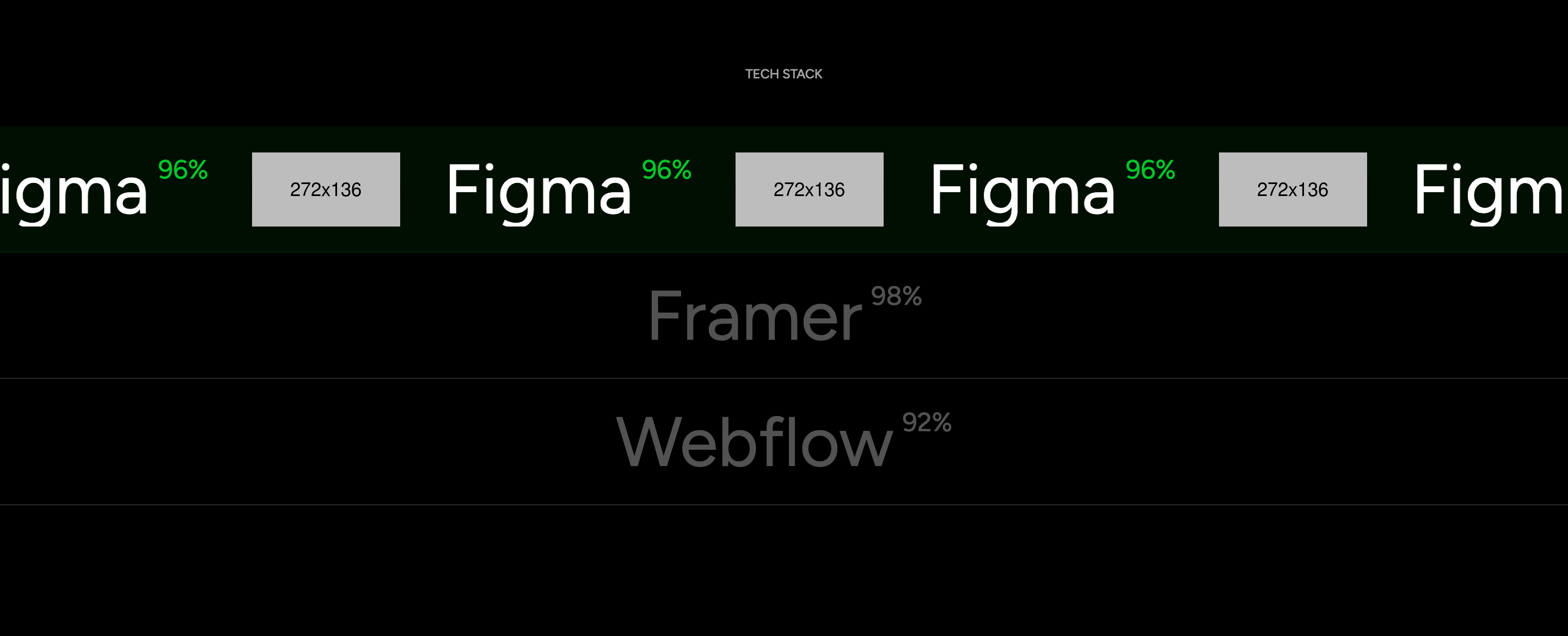
A skill / tooling section disguised as a vertical accordion of three rows. Each row collapses to a label + percent. The active row expands to a full-width strip that runs an infinite marquee of duplicated label and logo pairs (Figma, Framer, Webflow). Only one row is active at a time, so animation cost stays bounded.
HTML structure (minimal)
<section class="section-tech-stack flat-spacing">
  <div class="container">
    <h6 class="mini-title text-caption text-white-64 text-center">TECH STACK</h6>
  </div>
  <ul class="tech-stack-list main-action-active">
    <li class="wg-tech btn-active active">
      <div class="tech_text">
        <p class="h1 fw-normal">Figma</p>
        <h6 class="fw-normal">96%</h6>
      </div>
      <div class="infiniteSlide_tech_main">
        <div class="infiniteSlide infiniteSlide_tech" data-clone="5">
          <div class="app_name"><div class="tech_text"><p class="h1 text">Figma</p><h6 class="process fw-normal">96%</h6></div></div>
          <div class="app_icon"><img src="assets/images/section/app-figma.png" alt=""></div>
          <!-- duplicated three times -->
        </div>
      </div>
    </li>
    <li class="wg-tech btn-active">…Framer 98%…</li>
    <li class="wg-tech btn-active">…Webflow 92%…</li>
  </ul>
</section>
Key SCSS tokens
.section-tech-stack {
  .wg-tech {
    border-top: 1px solid var(--white-16);
    overflow: hidden;
    height: 90px;
    transition: height 0.6s ease;

    .infiniteSlide_tech_main { opacity: 0; transition: opacity 0.4s ease; }

    &.active {
      height: 220px;
      .infiniteSlide_tech_main { opacity: 1; }
    }
  }
  .infiniteSlide_tech {
    display: flex;
    gap: 64px;
    align-items: center;
    will-change: transform;
  }
}
Animation logic
// assets/js/main.js — infiniteSlide()
$('.infiniteSlide').each(function () {
  var $this = $(this);
  var clone = $this.data('clone') || 2;
  var speed = $this.data('speed') || 50;
  // duplicates children N times then animates translateX with requestAnimationFrame at `speed` px/s.
});

// active row toggle is wired via .main-action-active in main.js — clicking another row swaps the .active class.
Notable details
- Activation pattern: only one row is
activeat a time, so only one infinite marquee animates — saves repaint and battery on mobile compared to 3 simultaneous marquees. - The
data-cloneattribute lets each marquee duplicate its content N times in JS to ensure seamless wrap regardless of viewport width. - The label and percent in the marquee mirror the static label outside, reinforcing the active item without a separate cursor.
Use when
- Skills / tooling lists where you want the hovered or active item to break free from the row and become a full-bleed strip.
- Lists where keeping animation cost bounded matters (e.g. battery-conscious mobile portfolios).
Caveats
infinityslide.jsis a small custom plugin shipped with the template — keep it bundled if you reuse this section.- The active row's height jump (90 → 220px) reflows neighbours; pair with
will-change: heightfor smoother transitions.