off-promo-duo
CTA·Шаблон: Addina - Multipurpose eCommerce HTML Template·Складність анімації: subtle·Адаптивний: Так
Файли-джерела
- index.html
section.furniture-off
Бібліотеки
bootstrapjquery
Summary
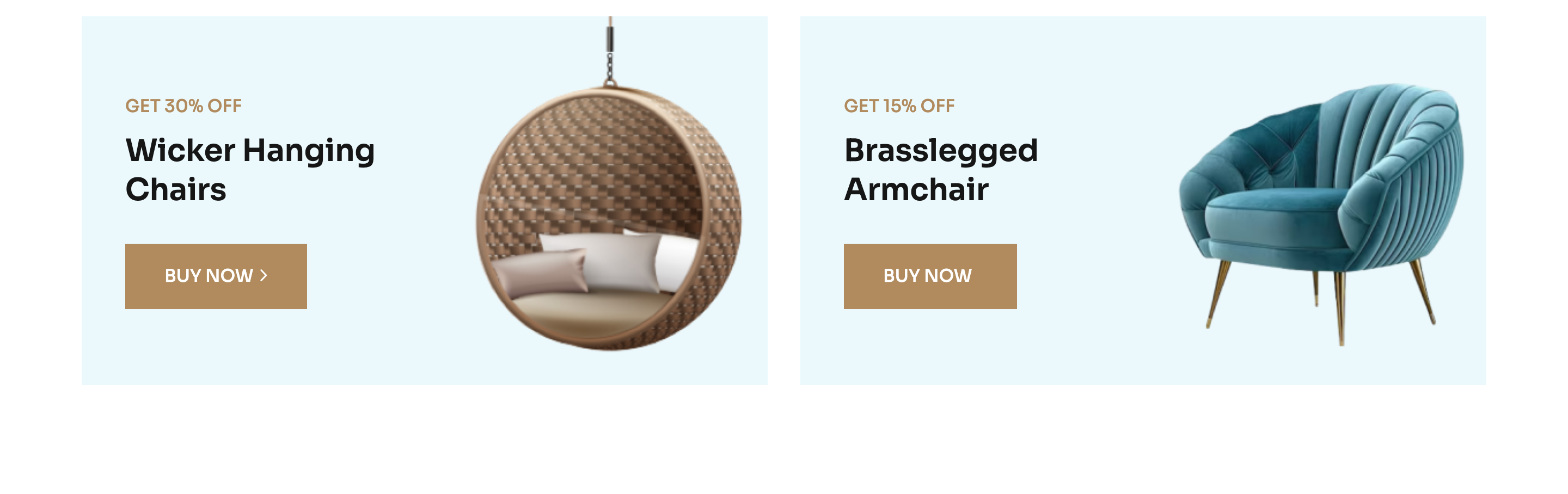
Two side-by-side full-bleed promo cards with a discount badge, a two-line capitalised heading and a solid arrow CTA. Each card uses a data-background image attribute so the background is wired up in JS rather than baked into CSS.
HTML structure (minimal)
<section class="furniture-off pb-100">
  <div class="container">
    <div class="row g-4">
      <div class="col-lg-6">
        <a href="#" class="furniture-off__item bg-image d-block"
           data-background="assets/imgs/furniture/product/off-01.png">
          <span class="fo-discount">GET 30% OFF</span>
          <h3 class="text-capitalize">wicker hanging <br> chairs</h3>
          <div class="solid-btn mt-30">Buy Now<span><i class="fa-regular fa-angle-right"></i></span></div>
        </a>
      </div>
      <div class="col-lg-6">
        <a href="#" class="furniture-off__item bg-image d-block"
           data-background="assets/imgs/furniture/product/off-02.png">
          <span class="fo-discount">GET 15% OFF</span>
          <h3 class="text-capitalize">Brasslegged <br> Armchair</h3>
          <div class="solid-btn mt-30">Buy Now<span><i class="fa-regular fa-angle-right"></i></span></div>
        </a>
      </div>
    </div>
  </div>
</section>
Key SCSS tokens
.furniture-off__item {
  position: relative;
  padding: 60px 60px;
  min-height: 380px;
  border-radius: 6px;
  background-size: cover;
  background-position: center;
  .fo-discount {
    display: inline-block;
    background-color: var(--clr-common-white);
    color: var(--clr-theme-primary);
    padding: 4px 14px;
    font-weight: 600;
    text-transform: uppercase;
  }
  h3 { font-size: 36px; font-weight: 600; }
  &:hover .solid-btn { background: transparent; color: var(--clr-theme-primary); }
}
.bg-image {
  background-position: center;
  background-repeat: no-repeat;
  background-size: cover;
}
Animation logic
// data-background → inline background-image (assets/js/main.js)
$("[data-background]").each(function () {
  $(this).css("background-image", "url(" + $(this).attr("data-background") + ")");
});
Notable details
- The whole card is wrapped in a single
<a>so the entire surface is one clickable target — accessible and predictable. - A
data-backgroundattribute is read on DOM ready and converted into abackground-imagestyle — convenient when the same markup gets reused with different images. - The discount badge is white-on-bronze, inverting the rest of the page's colour relationship to draw attention.
Use when
- Two parallel promotional offers on a category or home page.
- Above-the-fold split banners where you want photo + copy without an iframe video.
- "Featured / On Sale" pairings on lookbook pages.
Caveats
data-backgroundrequires jQuery boot; in a framework port setstyle="background-image: ..."directly.- Text legibility depends on the photograph; consider adding a subtle dark gradient overlay if you swap to busier images.